Gráficos footprint
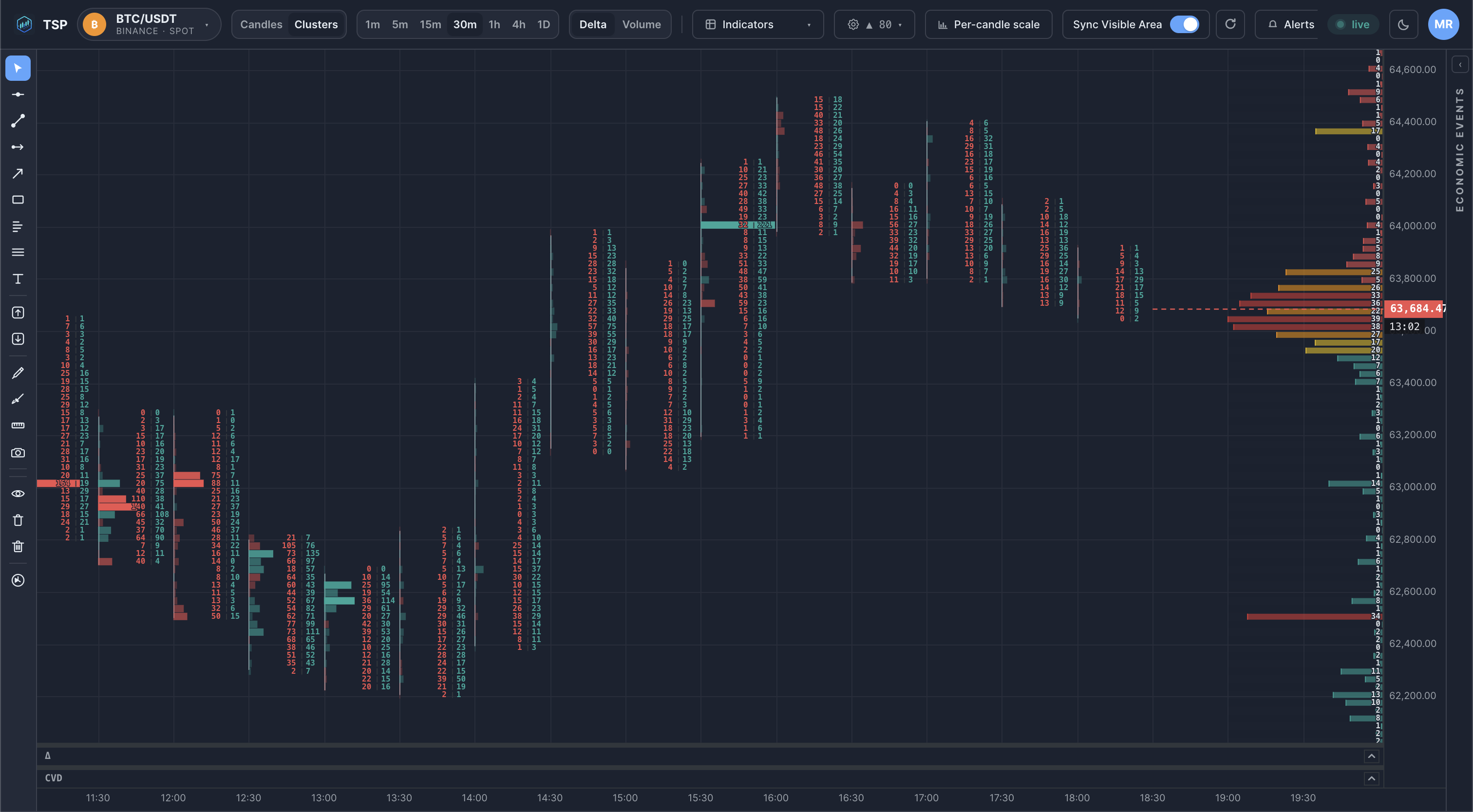
Un gráfico footprint muestra el volumen de compra y de venta negociado en cada nivel de precio dentro de una vela, convirtiendo una sola barra en un mapa detallado del flujo de órdenes en lugar de solo cuatro valores OHLC.
¿Qué es un gráfico footprint?
A standard candlestick tells you only where price opened, closed, and how far it travelled. A footprint chart keeps that bar shape but fills it in: each price level inside the bar is annotated with how much volume traded there, split into aggressive buying (lifting the ask) and aggressive selling (hitting the bid). The result is a vertical column of numbers — or a colour-graded heatmap — that reveals where inside the bar the activity actually happened.
Como los mercados de cripto operan de forma continua e imprimen cada transacción, los gráficos footprint encajan de forma natural: la cinta de operaciones es lo bastante rica como para reconstruir el reparto bid/ask en cada nivel sin necesidad de estimaciones.
¿Por qué es importante?
Dos barras pueden parecer idénticas en un gráfico de velas y, sin embargo, describir batallas completamente distintas. Una barra verde puede ser acumulación sostenida en todos los niveles; otra puede ser un único barrido violento sin continuación. Los gráficos footprint hacen visible esa diferencia. Ayudan a ver:
- Absorption — heavy selling that fails to push price lower, suggesting resting buyers are soaking it up.
- Imbalances — price levels where buy volume dwarfs sell volume (or vice versa) by a wide margin.
- Exhaustion — thinning volume at the extreme of a move, where the last aggressors run out.
Son observaciones descriptivas sobre cómo se distribuyó el volumen, no señales ni predicciones de trading.
Cómo lo usan los traders
Los traders de flujo de órdenes suelen leer los gráficos footprint en las temporalidades bajas, donde cada impresión todavía importa: de 1m a 15m en cripto. Flujos de trabajo habituales:
- Observar cómo el punto de control (el nivel más negociado) de cada barra migra hacia arriba o hacia abajo a medida que se desarrolla una tendencia.
- Buscar un cúmulo de desequilibrios de compra apilados justo por encima de un nivel de soporte antes de decidir que el nivel aguantó.
- Comparar la delta (compra neta menos venta) de barras consecutivas para calibrar si la agresión está creciendo o desvaneciéndose.
Ejemplo en un gráfico
Errores comunes
- Reading footprints on too high a timeframe. On a 4h bar the level-by-level detail blurs together; footprints are most informative on the timeframes where single prints are still distinguishable.
- Treating an imbalance as a signal. A lopsided level describes what already traded — it is context, not a forecast.
- Ignoring the surrounding structure. Absorption at a random level means little; the same absorption at a tested support or a volume-profile node is far more meaningful.
- Confusing volume with delta. A high-volume level can still have near-zero delta if buying and selling were balanced.
Cómo lo visualiza TSP Core
TSP Core dibuja los footprints como columnas de clústeres en vivo directamente sobre el gráfico de precio, actualizándose a partir de datos de mercado en tiempo real a medida que se imprime cada operación. Cada barra se divide en bandas de precio configurables; dentro de una banda puedes ver el volumen negociado y el reparto compra/venta, con los niveles más activos resaltados. La barra que se está formando se actualiza tick a tick y la barra completada queda fijada en los mismos valores que llegan al historial, de modo que lo que observas en tiempo real coincide con lo que revisas después.
Mira gráficos footprint sobre datos de cripto en vivo
Abre el panel de TSP Core y observa cómo se forma el volumen bid/ask dentro de cada barra en tiempo real.