Profil de volume
Un profil de volume est un histogramme horizontal du volume échangé par prix sur une plage choisie. Au lieu de demander quand le volume s'est produit, il demande à quel prix — révélant les niveaux que le marché a le plus lourdement échangés.
Qu'est-ce qu'un profil de volume ?
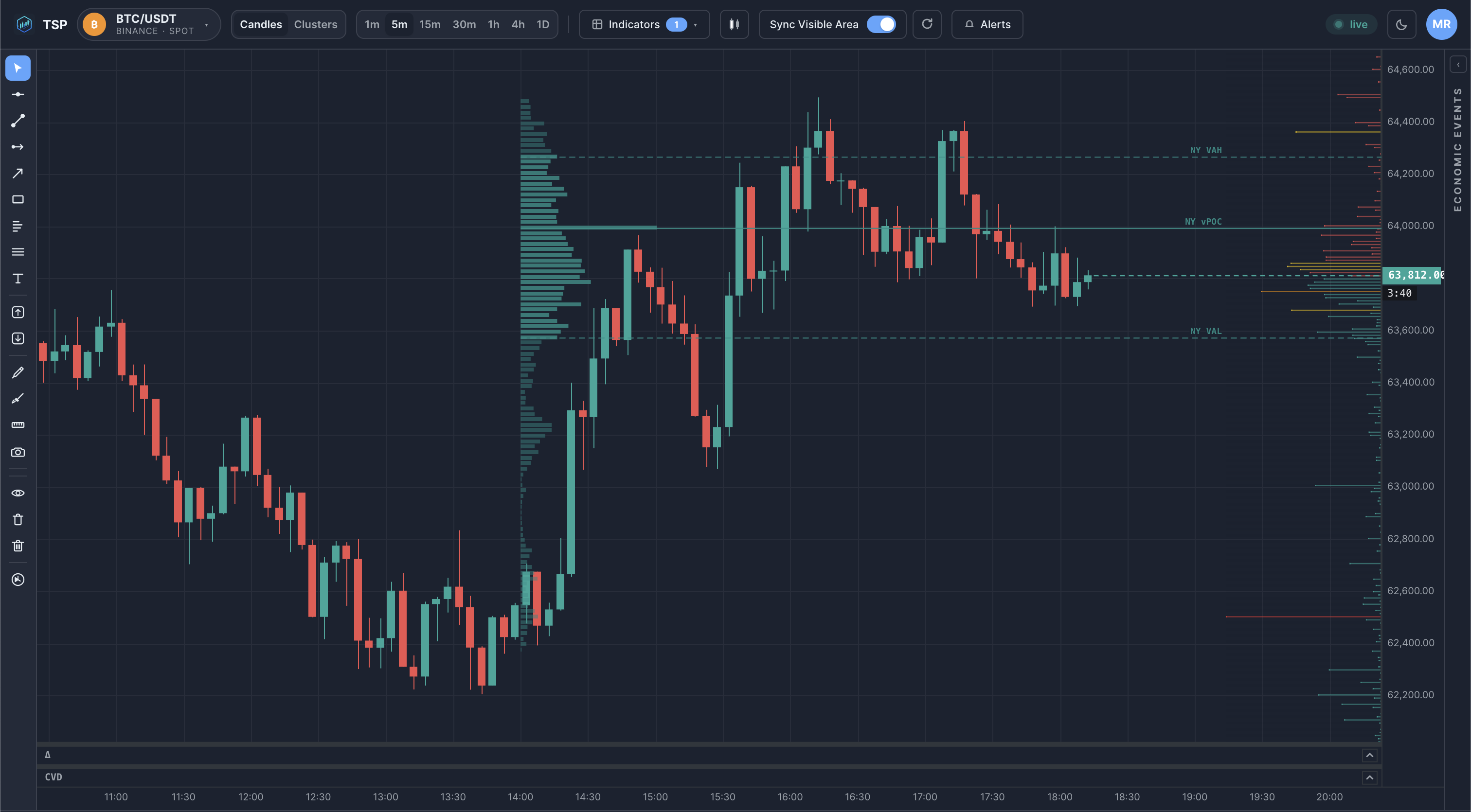
Choisissez une plage — une session, une journée, un swing ou une sélection arbitraire — et totalisez le volume échangé à chaque prix qu'elle contient. Tracez ces totaux à l'horizontale et vous obtenez un profil : de longues barres aux prix qui ont beaucoup échangé, de courtes barres là où le prix est passé rapidement. Trois repères en ressortent :
- Point of Control (POC) — the single price that traded the most volume; the profile's peak.
- Value Area — the price band containing the bulk of the volume, commonly about 70%.
- Low-volume nodes — thin areas the market moved through without trading much.
Pourquoi est-ce important ?
Un profil de volume recadre le graphique autour de l'acceptation du prix plutôt que du temps :
- High-volume prices mark areas the market spent effort trading — often referenced again later.
- The value area describes the range where most business was done over the period.
- Low-volume gaps show prices that were rejected quickly the last time through.
Ce sont des observations descriptives de l'endroit où le volume s'est échangé — un contexte pour une analyse autonome, non des prédictions ni des recommandations.
Comment les traders l'utilisent
- Tracer un profil sur la session ou la journée précédente pour trouver son POC et les bords de sa zone de valeur.
- Observer comment le prix se comporte lorsqu'il revient sur un prix à fort volume par rapport à un vide à faible volume.
- Ancrer un profil à un événement ou un swing précis pour étudier l'acceptation depuis ce point.
Exemple sur un graphique
Erreurs courantes
- Treating the POC as a guaranteed magnet or wall. It marks where volume traded; how price reacts there is context, not a certainty.
- Choosing an arbitrary range. A profile only means something over a deliberate range — a session, a swing, an event — not a random window.
- Confusing it with a time-based volume bar. A volume profile is volume by price; the histogram under the chart is volume by time. They answer different questions.
Comment TSP Core le visualise
TSP Core construit des profils de volume sur n'importe quelle plage que vous sélectionnez et les superpose au graphique des prix, marquant le point de contrôle et les limites de la zone de valeur. Les profils sont calculés à partir des mêmes données historiques et en direct que le reste de l'espace de travail, de sorte que les niveaux que vous lisez s'alignent sur les vues footprint, clusters et sessions adjacentes.
Voir les profils de volume sur des données crypto en direct
Ouvrez le tableau de bord TSP Core et tracez des profils volume-par-prix sur n'importe quelle plage.